path 명령

옵션

  • \path 명령의 옵션은 뒤에 올 인수를 “어떻게” 처리하는지를 지시하는 정보다.
  • 복수의 옵션을 같이 사용할 수 있다.
  • 옵션 자체의 값인수를 =옵션값 형식으로 첨부할 수 있다.
옵션 옵션값 인수 설명
draw <color> 선을 그린다.
fill <color> 선으로 닫힌 공간을 색상으로 채운다.
pattern <pattern> 선으로 닫힌 공간을 패턴으로 채운다.
shade - 선으로 닫힌 공간을 세이딩한다.
clip - 선으로 닫힌 공간을 잘라낸다.

명령인수

  • \path 명령의 명령인수는 현재 펜의 좌표 또는 현재 펜의 좌표와 추가적인 지정좌표 사이에서 어떤 그림을 그리는지를 지시한다.
  • 그림의 형태를 자세하게 지정하기 위해 명령인수 뒤에 명령인수 자체의 옵션값을 붙일 수 있다.
명령인수 형식 그림 펜 이동 옵션
move-to <좌표> - 이동 -
line-to -- <좌표> 현재 펜 좌표에서 지정좌표까지 직선을 그린다. 이동 -
curve-to .. controls <좌표> .. <좌표> 현재 펜 좌표에서 지정좌표까지 곡선을 그린다. 이동 -
circle circle 현재 펜 좌표에서 원을 그린다. - radius
rectangle rectangle <좌표> 현재 펜 좌표에서 지정좌표까지 사각형을 그린다. 이동 -
grid grid <좌표> 현재 펜 좌표에서 지정좌표까지 그리드를 그린다. 이동 step
node node {text} 현재 펜 좌표에서 텍스트박스를 그린다. - shape, draw, fill, …

라인

\documentclass{standalone}
\usepackage{kotex}
\usepackage{tikz}
\usetikzlibrary{shapes.geometric}
\setmainhangulfont{Noto Sans KR}
\begin{document}
    \begin{tikzpicture}
      \path[draw]
        (0,0)
        -- (1,0)
        ;
    \end{tikzpicture}
\end{document}

\documentclass{standalone}
\usepackage{kotex}
\usepackage{tikz}
\usetikzlibrary{shapes.geometric}
\setmainhangulfont{Noto Sans KR}
\begin{document}
    \begin{tikzpicture}
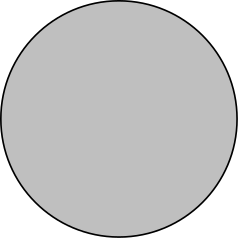
      \path[draw=black,fill=lightgray]
        (0,0)
        circle[radius=1cm]
        ;
    \end{tikzpicture}
\end{document}
\documentclass{standalone}
\usepackage{kotex}
\usepackage{tikz}
\usetikzlibrary{shapes.geometric}
\setmainhangulfont{Noto Sans KR}
\begin{document}
    \begin{tikzpicture}
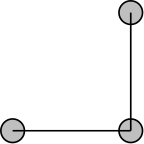
      \path[draw,fill=lightgray]
        (0,0)
        circle[radius=0.1cm]
        -- (1,0)
        circle[radius=0.1cm]
        -- (1,1)
        circle[radius=0.1cm]
        ;
    \end{tikzpicture}
\end{document}
\documentclass{standalone}
\usepackage{kotex}
\usepackage{tikz}
\usetikzlibrary{shapes.geometric}
\setmainhangulfont{Noto Sans KR}
\begin{document}
    \begin{tikzpicture}
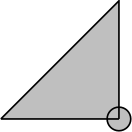
      \path[draw, fill=lightgray]
        (0,0)
        -- (1,0)
        circle[radius=0.1cm]
        -- (1,1)
        -- (0,0)
        ;
    \end{tikzpicture}
\end{document}
\documentclass{standalone}
\usepackage{kotex}
\usepackage{tikz}
\usetikzlibrary{shapes.geometric}
\setmainhangulfont{Noto Sans KR}
\begin{document}
    \begin{tikzpicture}
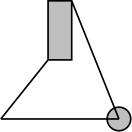
      \path[draw, fill=lightgray]
        (0,0)
        -- (1,0)
        circle[radius=0.1cm]
        -- (0.6,1)
        rectangle (0.4,0.5)
        -- (0,0);
    \end{tikzpicture}
\end{document}
node

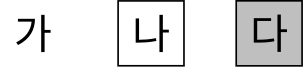
  • 노드는 특수한 명령인수다.
  • {}의 형태로 텍스트를 받아서 그린다.
  • 상위 \path 명령의 draw, fill 옵션의 영향을 받지 않고 자체 draw, fill 옵션만 따른다.
\documentclass{standalone}
\usepackage{kotex}
\usepackage{tikz}
\usetikzlibrary{shapes.geometric}
\setmainhangulfont{Noto Sans KR}
\begin{document}
    \begin{tikzpicture}
      \path
        (0,0) node {가}
        (1,0) node[draw] {나}
        (2,0) node[draw,fill=lightgray] {다}
        ;
    \end{tikzpicture}
\end{document}
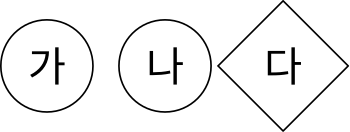
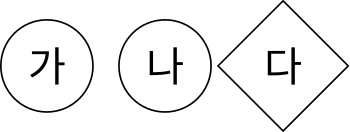
  • shape 자체옵션값을 지정하여 박스의 모양을 바꿀 수 있다.
  • shape 자체옵션값을 지정할 때 shape= 부분을 생략하고 값만 쓸 수 있다.
\documentclass{standalone}
\usepackage{kotex}
\usepackage{tikz}
\usetikzlibrary{shapes.geometric}
\setmainhangulfont{Noto Sans KR}
\begin{document}
    \begin{tikzpicture}
      \path
        (0,0) node[draw,shape=circle] {가}
        (1,0) node[draw,circle] {나}
        (2,0) node[draw,diamond] {다}
        ;
    \end{tikzpicture}
\end{document}
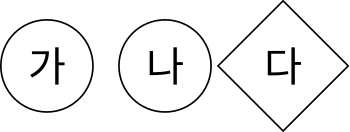
  • at <좌표>” 특수 인수를 붙이면 현재 좌표와 아무런 상관없이 지정한 좌표에 놓을 수 있다.
\documentclass{standalone}
\usepackage{kotex}
\usepackage{tikz}
\usetikzlibrary{shapes.geometric}
\setmainhangulfont{Noto Sans KR}
\begin{document}
    \begin{tikzpicture}
      \path
        node[draw,circle]  at (0,0) {가}
        node[draw,circle]  at (1,0) {나}
        node[draw,diamond] at (2,0) {다}
        ;
    \end{tikzpicture}
\end{document}
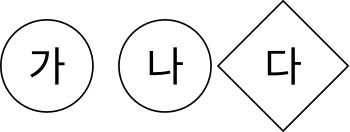
  • 재사용을 위해 “node (이름)”의 형태로 이름을 붙일 수 있다.
\documentclass{standalone}
\usepackage{kotex}
\usepackage{tikz}
\usetikzlibrary{shapes.geometric}
\setmainhangulfont{Noto Sans KR}
\begin{document}
    \begin{tikzpicture}
      \path
        node[draw,circle]  (a) at (0,0) {가}
        node[draw,circle]  (b) at (1,0) {나}
        node[draw,diamond] (c) at (2,0) {다}
        ;
    \end{tikzpicture}
\end{document}

  • \path ... node ... 명령을 \node ...로 축약 가능
\documentclass{standalone}
\usepackage{kotex}
\usepackage{tikz}
\usetikzlibrary{shapes.geometric}
\setmainhangulfont{Noto Sans KR}
\begin{document}
    \begin{tikzpicture}
      \node[draw,circle]  (a) at (0,0) {가};
      \node[draw,circle]  (b) at (1,0) {나};
      \node[draw,diamond] (c) at (2,0) {다};
    \end{tikzpicture}
\end{document}